This thread has been translated into English.
DLL File Conflict
Mitch341 · 2025-12-20
Hi there, I use video and photo editing software for my "work".
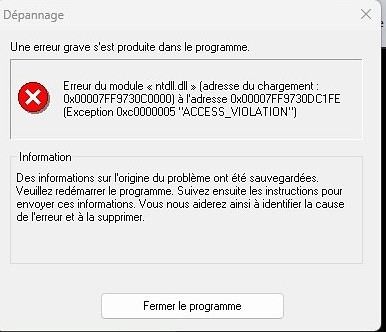
A conflict has been showing up lately when I open the software. Photo attached.
Is there a specialist around who could help me out?
Thanks in advance.
DLL File Conflict
Mathews · 2025-12-20
hi, I recommend reinstalling the software while obviously backing up all your data.
However, could you describe more precisely when this happens?
A brief "pattern"—like a description of a series of steps—would be helpful.
DLL file conflict
Mitch341 · 2025-12-21
hi, I recommend reinstalling the software while obviously backing up all your data.
However, could you describe more precisely when this happens?
A brief "pattern"—a description of a series of steps—would be helpful.
Hello Mat! I use Magix products for Video 2026 and Photo 2026 as well.
The crash occurs after opening the installed and reinstalled software on different hard drives. Nothing works. I also use Wondershare Filmora 15, which runs perfectly.
I’ve opened a ticket with Magix and am waiting for a response.
DLL file conflict
Mathews · 2025-12-21
hi there, two possible solutions:
*find the executable file, select it with your mouse without clicking, right-click and choose "Run as administrator"
*select all the files in the directory where the software is installed and choose "Properties"
Check that the "Read-only" box isn’t selected
DLL file conflict
Mitch341 · 2025-12-23
Thanks for your insightful advice. After a day of digging online, no solution in sight—Magix, the developer and seller of both software programs, doesn’t have clear answers and isn’t responding quickly enough to crash reports for their tools.
So, I canceled the subscriptions with a refund within the 14-day window and switched to two new programs that work perfectly.
Best,